Blue News School Update Newsletter: A Minimalist Framework for Professional Communication
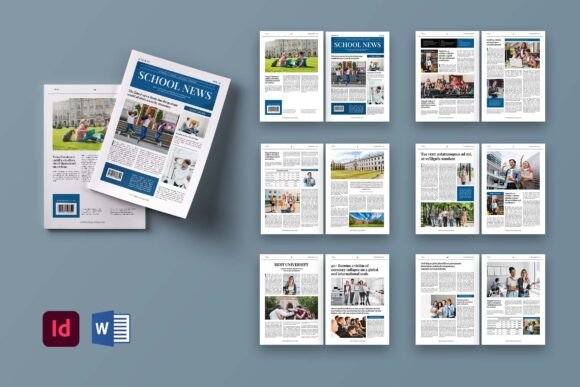
In the landscape of digital and print communication, the ability to convey information clearly without visual clutter is a distinct advantage. The Blue News School Update Newsletter addresses this need by offering a structured, professional template designed for consistency and ease of use. While the name suggests an educational context, the underlying architecture of the design makes it a versatile tool for a wide array of creative businesses, corporate entities, and individual creators. This assessment explores the practical utility of the template, its technical specifications, and how it fits into a modern workflow involving Adobe InDesign and Microsoft Word.
Defining the Purpose and Design Philosophy
The core philosophy behind the Blue News School Update Newsletter is minimalism. It strips away unnecessary decorative elements that often distract from the primary message, focusing instead on typography, hierarchy, and whitespace. For professionals aged 20 to 50 who manage their own content strategies, this approach reduces cognitive load during the editing process. The layout is not merely a collection of boxes; it is a cohesive system intended to guide the reader's eye naturally through the content.
When evaluating the Blue News School Update Newsletter, one must consider its dual nature as both a proposal brochure and a newsletter. This duality allows users to repurpose the asset for different stages of client interaction. Whether presenting a project proposal or sending a monthly update to a stakeholder list, the visual identity remains consistent, reinforcing brand reliability. The "minimal and professional" descriptor is not just marketing fluff; it reflects a deliberate choice to prioritize readability over ornamentation.
Technical Specifications and Print Readiness
For those working in environments where physical distribution is still relevant, the technical precision of the template is a significant strength. The document is formatted to standard A4 dimensions (21cm x 29.7cm), ensuring compatibility with most office printers and professional printing services. Crucially, the file includes a 3mm bleed area, a non-negotiable requirement for offset printing to prevent white edges if the cut is slightly off-center.
- Resolution: The template is set at 300 DPI, which is the industry standard for high-quality print output. This ensures that any text or vector graphics included remain sharp and do not pixelate when printed.
- Color Mode: Utilizing CMYK format aligns the design with commercial printing processes, avoiding the color shifts that often occur when RGB files are converted post-design.
- Page Count: With 12 custom pages including a front and back cover, the package offers substantial volume for detailed reporting, case studies, or comprehensive newsletters without requiring the user to stitch multiple documents together.
Workflow Efficiency Across Platforms
One of the most compelling aspects of the Blue News School Update Newsletter is its flexibility across software platforms. It is available in both Adobe InDesign and Microsoft Word formats, catering to different skill levels and workflow preferences. This cross-platform availability is rare in premium templates and significantly broadens its potential user base.
Adobe InDesign Implementation
For designers and publishers familiar with Adobe InDesign, the template demonstrates a high level of organization. The use of paragraph styles and character styles is critical here. These styles allow for global updates; changing a font size or color in the style definition automatically applies the change throughout the entire 12-page document. This feature alone can save hours of manual formatting time. Furthermore, the smart layer structure ensures that objects are neatly organized, making it easy to locate specific elements like headers, footers, or image placeholders without sifting through a chaotic layer panel.
Microsoft Word Adaptability
Not every professional has access to or prefers using Adobe InDesign. Many educators, small business owners, and marketers operate primarily within the Microsoft ecosystem. The inclusion of a fully editable Word version democratizes access to high-quality design. Users can leverage familiar tools to edit text, swap images, and adjust colors without needing to learn complex desktop publishing software. Despite being in Word, the template maintains the structural integrity required for a professional look, proving that good design does not always require expensive software.
Usability and Customization Potential
Evaluating the usability of the Blue News School Update Newsletter reveals a balance between structure and freedom. The template provides a rigid framework for layout, ensuring that the final product looks polished regardless of the user's design skills. However, it does not lock the user into a single aesthetic. All text, colors, and objects are fully editable, allowing for deep customization to match specific brand guidelines.
The recommendation to use free fonts further enhances accessibility. By avoiding proprietary typefaces that require licensing fees or special installation, the template ensures that the design opens correctly on any machine. This prevents the common frustration of missing fonts causing layout breaks. When customizing the Blue News School Update Newsletter, users can easily replace placeholder images with their own photography or illustrations, though they should be aware that image previews are not included in the download. This requires the user to source their own high-resolution assets to meet the 300 DPI print standard.
Real-World Application Scenarios
The versatility of this template extends beyond traditional school updates. Consider a freelance graphic designer who needs to send a quarterly report to clients. The professional layout serves as a subtle but effective way to demonstrate competence and attention to detail. Similarly, a small business owner launching a new product line could use the 12-page capacity to create a mini-brochure detailing features, pricing, and testimonials.
For bloggers and publishers, the newsletter format is ideal for distributing serialized content. The clean lines and ample white space make reading comfortable on screens, while the export-to-PDF capability ensures the document retains its formatting when sent via email. The ability to switch between print and digital modes means a single purchase supports multiple distribution channels, maximizing the return on investment.
Strengths, Limitations, and Strategic Fit
Like any resource, the Blue News School Update Newsletter has specific strengths and limitations that determine its suitability for various projects. Its primary strength lies in its efficiency. The pre-built styles and organized layers mean that users spend less time fighting the software and more time crafting content. The consistent presentation builds trust with the audience, a crucial factor for educators and business owners alike.
However, potential users should be realistic about expectations. The template is a starting point, not a finished product. It requires the user to supply high-quality content and imagery. If the input material is low-resolution or poorly written, the template cannot compensate for these deficiencies. Additionally, while the design is minimal, some users seeking highly stylized or avant-garde layouts might find the structure too conservative. It excels in clarity and professionalism rather than artistic experimentation.
Who Should Use This Template?
This resource is particularly well-suited for:
- Educators and Administrators: Who need to communicate regularly with parents or staff in a formal yet accessible manner.
- Small Business Owners: Who require cost-effective solutions for creating brochures and reports without hiring a full-time designer.
- Freelancers and Creators: Who value a streamlined workflow and need to deliver professional-looking files quickly.
- Marketers: Who need a reliable format for email newsletters that converts well to PDF for offline reading.
Final Assessment of Value
The Blue News School Update Newsletter represents a pragmatic approach to design asset acquisition. It avoids the trap of over-complication, offering a straightforward solution to a common problem: how to present information professionally without excessive effort. The combination of A4 print readiness, 300 DPI resolution, and multi-format support (InDesign and Word) creates a robust toolset for the modern creator.
While it lacks the flash of highly decorative templates, its adherence to functional design principles ensures longevity. As long as the user adheres to the provided styles and supplies quality content, the Blue News School Update Newsletter will consistently produce results that look authoritative and credible. For professionals seeking to elevate their communication standards without investing in expensive software training or custom design services, this template offers a solid foundation for success.